
How to make the 58th Floor AI video
Put the two of you on the 58th floor
One photo in Raps first, one in Takes the verse. New accounts can watch a free 2-second preview first.
Who you play
Add both photos
See the first 2 seconds free. The full video is 900 credits.
One person per photo, face clearly visible. JPG, PNG or WebP up to 10 MB.
- No app
- No watermark
- Credits back if a video fails
The 58th Floor AI video is the teal COLORS studio clip where one of you raps the hook at the camera and the other turns in and takes the verse at the hanging mic. You need two photos, one for each role. This guide covers which photo should take which role, the steps, posting it on TikTok and Reels, and what to change when a face looks off.
- You need: two photos, one person in each
- You get: 15 seconds, 9:16, 720p, song included
- Price: from $9.90 for one video, no subscription
Three ways to make the 58th Floor AI video
Pick by what you have: a teal wall and a friend who knows the bars, time to write and retry a prompt, or two photos.
| Film it yourselfWith a phone and a friend | Write an AI promptIn an AI video tool that takes photosGet the prompt | Two photos hereNo app, no promptUse our photos | |
|---|---|---|---|
| What you need | A plain wall, a mic or something hanging that looks like one, someone to film, and both of you rapping your parts | Two photos, a long prompt and a few tries | Two clear photos, one person in each |
| What comes back | Your own performance, as good as your timing | A new room, new cuts and new timing on every try | The teal studio clip with its four camera cuts, starring you two |
| Who raps when | Whatever you rehearse | Whatever the tool makes of your prompt | Fixed: Raps first opens on the hook, Takes the verse turns in at about 3.5 seconds |
| The song | Add it in TikTok when you post | Depends on the tool | Already under the video |
What you need for the 58th Floor AI video
Two photos and an email address. Each person takes the face, hair and top from their own photo, so choose the photos with that in mind.
- Photos
- Two, one per role
- Both roles need a photo before Generate video unlocks. One person per photo; a group shot or a selfie with a friend in it confuses who is who.
- Each photo
- Sharp, front-facing, even light
- The whole face visible, no sunglasses, hat brim or hand over it. A waist-up photo is fine; the trousers and shoes it does not show can come from the clip, and a full-body photo shows the whole outfit.
- What you wear
- The top in your photo
- There is no outfit picker. If you want to show up in a suit like the pink one in the clip, use a photo where you are wearing one.
- Who can be in it
- You, or adults who said yes
- No public figures, no one under 18, and not the real artists. You tick a box before Generate video to confirm it.
- An account
- Sign in with an email code
- Type your email, enter the code we send, and you are in. New accounts get a free 2-second preview with the same two photos before they pay.
- Time
- About 7 minutes per video
- More than 9 in 10 runs finish. If one fails, its credits go back to your balance on their own.
Three steps from two photos to a 58th Floor video
Decide who is who first; the rest is one button.
- 1
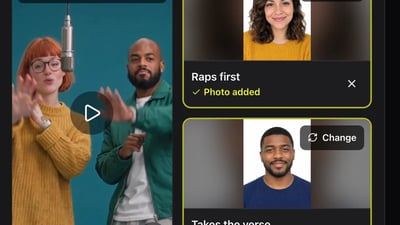
Choose who raps first
Decide which of you opens on the hook and which one turns in for the verse and gets the close-up, then pick a clear photo of each. The role guide below the generator shows what each one does, second by second.
- 2
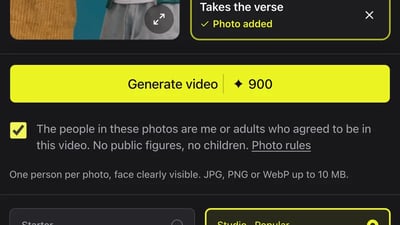
Fill the two role cards
Put the hook photo in Raps first and the verse photo in Takes the verse, tick the consent box and press Generate video. Sign in with an email code when the site asks.
- 3
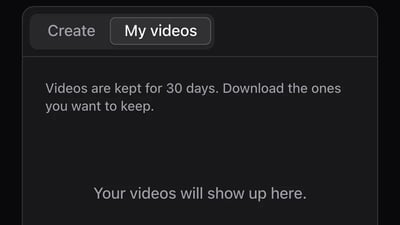
Come back for it in My videos
It takes about 7 minutes, and you don't need to keep the tab open. The finished MP4 waits in My videos for 30 days, ready to download or share as a link.
Hook or verse: who goes where
The two roles are not equal. Takes the verse gets the close-up, so give that card to the photo you most want to see filling the screen.
- 0 to 3.5 seconds
- Raps first has the hook
- Waist-up two-shot. The Raps first person raps toward the camera with their hands going, while Takes the verse stands beside them nodding with their mouth closed.
- About 3.5 to 5.5 seconds
- The turn
- Takes the verse turns to face the other person and starts the verse at about 4.9 seconds. Raps first starts dancing and nodding along.
- 5.5 to 8.7 seconds
- The close-up at the mic
- The camera cuts in on Takes the verse rapping into the hanging microphone. This face fills the frame, so this photo needs to be the sharpest of the two.
- 8.7 to 11.5 seconds
- The wide shot
- Both of you full-body on the low teal platform. This is where trousers and shoes show, and where a waist-up photo leaves the most to fill in.
- 11.5 to 15 seconds
- The low two-shot
- Back to the two of you together at the mic for the last bars, Raps first still hyping the verse.
- In the original
- .Paak's spot and Cordae's spot
- Raps first is where Anderson .Paak opens on the hook; Takes the verse is Cordae's verse. Put the friend who always talks back in Takes the verse and let them have the bars.
Post your 58th Floor video on TikTok and Reels
The file is ready to post as it is. These details decide whether it gets watched to the end.
- 1
Keep the clip's own sound
The song already plays under the video. If you pick a sound from TikTok's library anyway, turn the clip's own volume down in the editor so the two don't play over each other.
- 2
Say who is who in the caption
"Me on the hook, @friend on the verse" tells viewers what they are watching before the close-up lands, and tagging the verse rapper puts it on their profile too.
- 3
Switch on the AI label
TikTok has an AI-generated content toggle in the post settings, and Instagram asks when you upload. Turn it on; it is an AI video of real people.
- 4
Same file for Reels and Shorts
It is vertical 9:16, the shape all three apps use, so upload the same MP4 everywhere. There is no horizontal version.
When something looks off in your 58th Floor AI video
Nearly every problem traces back to one of the two photos. Change one thing per try; a new try costs the same as a new video.
A face does not look like the person
- Try this next
- Use a sharper photo of that person, facing the camera, in even light, with nothing covering the face
- Keep as is
- The other person's photo
The close-up at the mic looks off
- Try this next
- That is the Takes the verse photo filling the screen. Give that card your clearest, highest-resolution photo, or put the person with the better photo in that role
- Keep as is
- The Raps first photo
The wrong person opens on the hook
- Try this next
- The photo in Raps first always opens. Move each photo to the other card and generate again
- Keep as is
- The photos themselves
The trousers or shoes are not yours
- Try this next
- Expected with a waist-up photo: the top comes from your photo, and the wide shot fills in what it does not show. Use a full-body photo to show the whole outfit
- Keep as is
- The face, if it looks right
The video did not finish
- Try this next
- Press Generate video again. The credits for a failed run come back to your balance automatically
- Keep as is
- Your photos
Making the 58th Floor AI video: questions
Not here. The clip is a duet, so both roles need a photo before you can press Generate video. Use a photo of a friend, a sibling or a parent who agreed to be in it.
Yes. The photo in Raps first opens on the hook and the one in Takes the verse gets the close-up at the mic. Move each photo to the other card and generate again.
You can try it once. New accounts get 30 free credits when they sign up, enough for one 2-second preview with your two photos; it is watch-only. The full 15-second video starts at $9.90, paid once.
No. It comes out vertical 9:16, the shape TikTok, Reels and Shorts use, so it fills a phone screen.
We don't know of an official one. Here you don't need an app or a template: add two photos in the browser.
No. The studio, the cuts and the timing come from the clip. If you would rather use another AI video tool, the 58th Floor AI prompt guide has a prompt to copy.
We have only tested it with photos of people, so we don't promise pets. Use one clear photo of a person for each role.
More 58th Floor guides
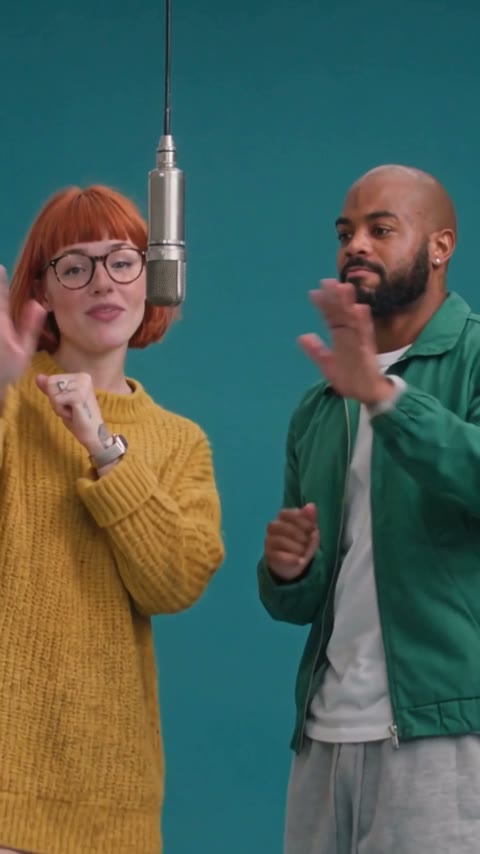
What is the 58th Floor trend?
The 58th Floor trend comes from Anderson .Paak and Cordae's performance of their song "58th Floor" for COLORS, posted on October 30, 2026. In a bare teal room with one microphone hanging from the ceiling, .Paak raps the hook while Cordae nods along, then the two turn to face each other and Cordae takes the verse. The AI version keeps that room, the mic and the camera cuts, and puts two people from uploaded photos in the two spots.
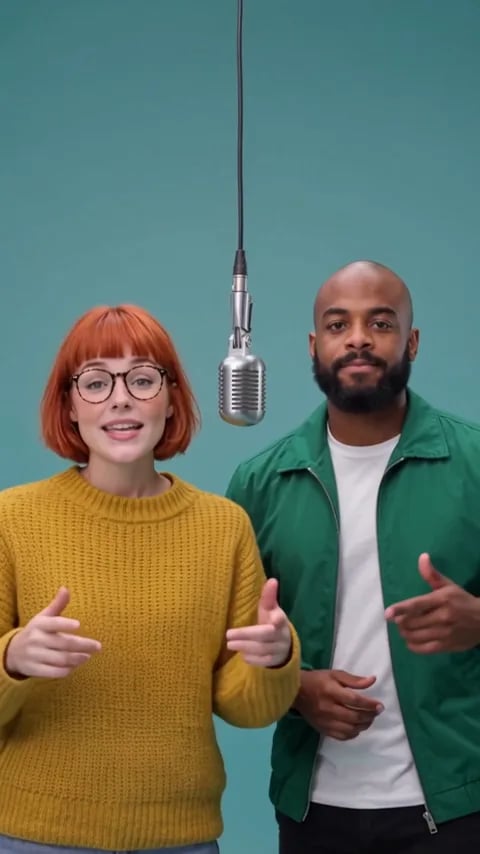
58th Floor AI prompt
Copy the 58th Floor AI prompt below into an AI video tool that takes two reference photos. We ran it once in Wan 3.0 with two portraits, so you can see what it got right, what it missed and what to change next. Rather not write a prompt? Make it here from two photos; the teal studio, the mic and every camera cut come from the trend's own clip.
58th Floor AI free: preview your duet first
Add two photos, one for the hook and one for the verse, and watch a free 2-second preview of you two in the teal studio under the hanging mic. No credit card. If you like how you look, make the full 15-second 58th Floor AI video with the same photos.
Hook or verse, decide and press Generate
Two photos, about 7 minutes, one teal studio.